SIM Registration
Getting a new SIM card in the Philippines? Or maybe you already have one and need to register it? Either way, you’re in the right place. SIM registration is now required by law for every mobile user in the country, and this guide will walk you through everything you need to know.
Quick Answer: To complete your smart sim registration, go to simreg.smart.com.ph or open the GigaLife App, enter your mobile number, upload a valid ID, take a selfie, and submit the form. Most users get approved within 24 to 72 hours. The process is free and only takes a few minutes.
Disclaimer: This website is for informational purposes only. We are not affiliated with, endorsed by, or officially connected to any government agency, telecom provider, or official organization. Always verify information through the relevant official sources.
This is official Website https://simreg.smart.com.ph/
This guide covers SIM registration for Smart, Talk N Text (TNT), Globe, TM, and DITO, so no matter which network you use, you’ll find clear answers here.
Millions of mobile subscribers in the Philippines have already completed SIM registration, while millions more still need to. Whether you’re registering for the first time, checking your status, or trying to fix an error message, you’ll find a clear answer in the sections below. We’ve also included a full comparison of every major network, so you can see exactly how the process differs (or doesn’t) depending on your provider.
What Is SIM Registration in the Philippines?
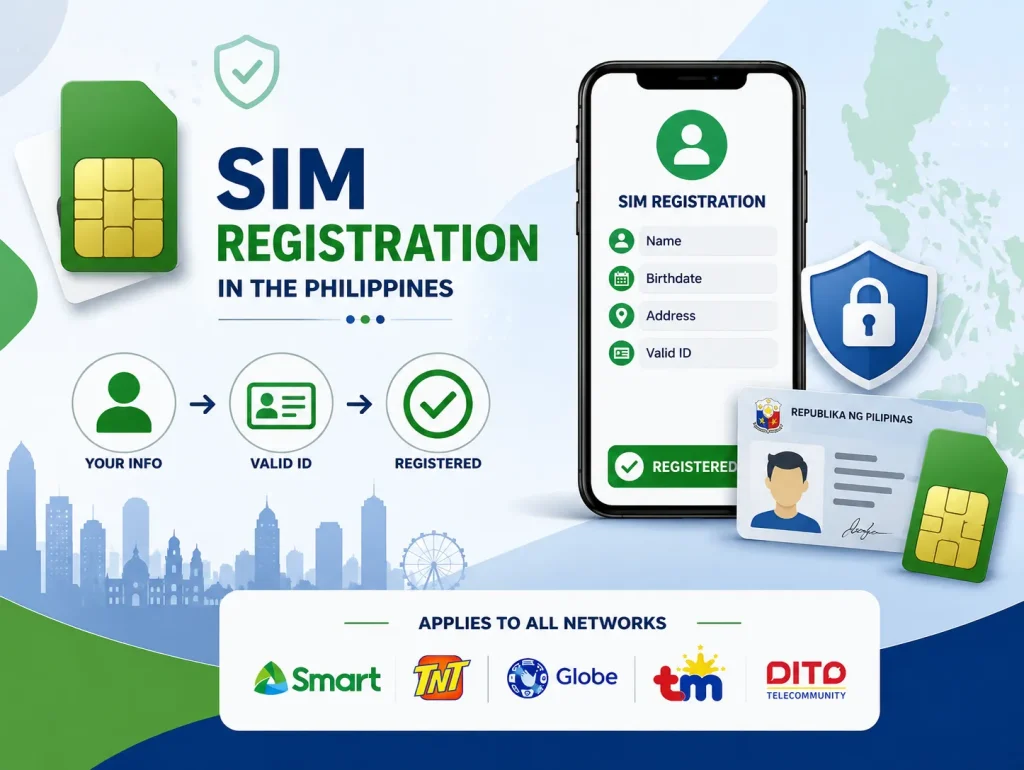
SIM registration means linking your mobile number to your real identity. You submit your name, birthdate, address, and a valid ID. Once approved, your SIM is officially tied to you.
This rule applies to every network in the country. Whether you use Smart, TNT, Globe, TM, or DITO, you must register or your SIM may stop working.
Why Is SIM Registration Required? (RA 11934 Explained)
The SIM Registration Act (REPUBLIC ACT NO. 11934, October 10, 2022)
The SIM Registration Act, also called RA 11934, was signed into law on October 10, 2022. The goal is simple: reduce text scams, phone fraud, and other crimes that use unregistered numbers. When every SIM card is linked to a real person, it becomes much harder for scammers to hide.
Registration Deadline & Extension History (Timeline)
The original deadline for sim registration was set soon after the law passed. Because millions of users needed time to comply, the government extended the deadline more than once. Telecom companies also opened extra registration channels, like retail stores and mobile application, to help more people finish on time. If you’re unsure whether you already missed a deadline, check your network’s official portal website or app. Late registration is usually still possible, but it’s best not to wait.
What Happens If You Don’t Register
If you don’t complete your sim card registration, will eventually be deactivated. This means no calls, no texts, and no mobile data. You won’t be able to use the number until you register it properly. If your SIM has already been deactivated, don’t worry; there’s a way to bring it back, which we’ll cover later in this guide.
Who Needs to Register Their SIM?
Almost everyone with a Philippine mobile number needs to complete SIM registration. Here’s how it works for different groups.
Existing SIM Users
If you already had a SIM card before the law took effect, you still need to register it. Your number will not update automatically.
New SIM Buyers
(Point-of-Sale Registration)
If you’re buying a brand-new SIM today, registration usually happens right at the store. This is called point-of-sale registration. The seller may ask for your ID on the spot, or you may need to finish the process online after buying.
SIM Registration for Minors (Under 18)
Minors can also register a SIM card, but a parent or legal guardian usually needs to help with the process. The guardian’s ID and information may be required alongside the minor’s details.
SIM Registration for Foreigners & Tourists
Foreigners and tourists using a Philippine SIM must also register sim. Instead of a local ID, a valid passport is typically accepted. This makes it easy for visitors to stay connected while following local rules.
SIM Registration for OFWs / Overseas Filipinos
Overseas Filipino Workers, or OFWs, can simcard registration their Philippine SIM even while abroad, as long as they have internet access and a valid ID. This is helpful for keeping a local number active for family communication or future use back home.
Documents & Requirements
Accepted Valid IDs (incl. Barangay ID & ePhilID)
You’ll need one valid government-issued ID. Common examples include a driver’s license, passport, UMID, voter’s ID, and PhilHealth ID. A Barangay ID and the ePhilID are also accepted by most networks, which is helpful for users who don’t have other forms of ID yet.
Personal Information Needed
Along with your ID, you’ll be asked for basic details:
- Full name
- Date of birth
- Sex
- Address
- Mobile number
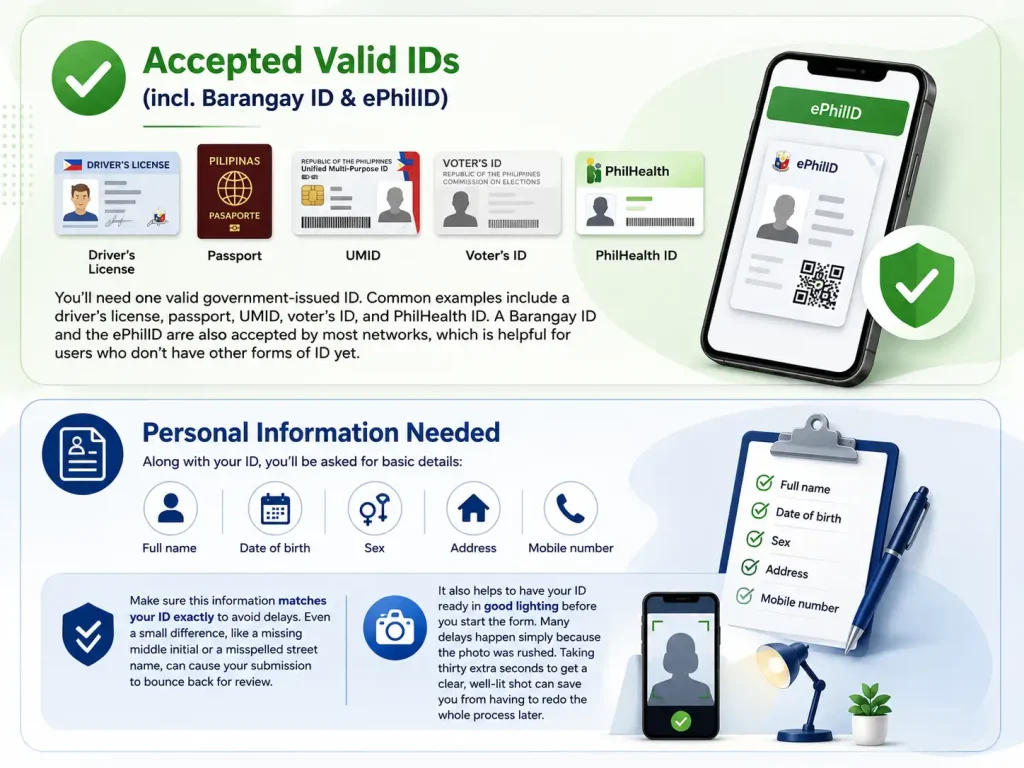
Make sure this information matches your ID exactly to avoid delays. Even a small difference, like a missing middle initial or a misspelled street name, can cause your submission to bounce back for review. Before you submit, take a moment to compare every field on the form with your ID side by side.
It also helps to have your ID ready in good lighting before you start the form. Many delays happen simply because the photo was rushed. Taking thirty extra seconds to get a clear, well-lit shot can save you from having to redo the whole process later.
What If You Don’t Have a Valid ID?
If you don’t have any of the accepted IDs, check with your network provider directly. Some offer alternative verification steps, though this can take longer. It’s best to get at least one basic government ID as soon as possible.
How to Register Your SIM Easily (6 Easy Step-by-Steps, All Methods)
There are several ways to complete your Smart Communications SIM registration. Pick the method that works best for you.
Online Portal (simreg.smart.com.ph)
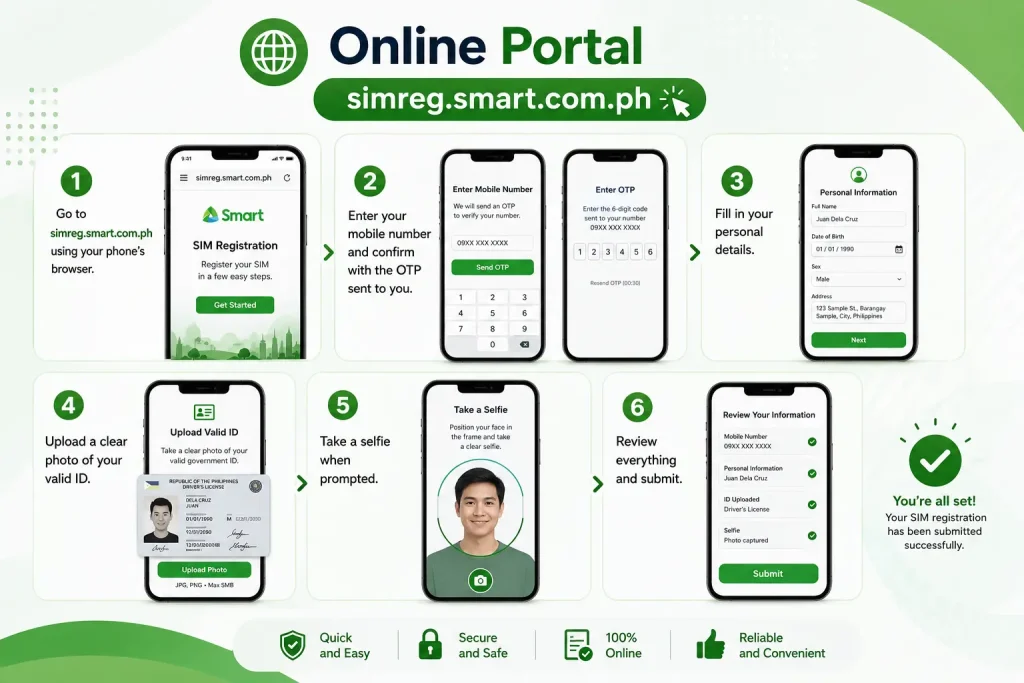
- Go to simreg.smart.com.ph using your phone’s browser.
- Enter Verify your mobile number and confirm with the OTP sent to you.
- Fill in your personal details , Choose your SIM registration smart type.
- Upload a clear photo of your valid ID.
- Take a selfie when prompted Provide your ID and Selfie, Fill up the registration
- Review everything and submit.
GigaLife App
The GigaLife App offers the same registration form in a simple mobile format. Download the app, log in or create an account, then look for the SIM registration banner or menu option to begin.
Scan QR Code on SIM Pack
New SIM packs usually include a QR code. Scanning this code with your phone camera takes you straight to the registration form, already linked to your SIM.
Via Smart Retailer/Store
You can also visit a Smart retail store in person. Bring your valid ID, and staff will help you complete the form on the spot.
Via Hotline/Helpline
If you prefer speaking with someone, Smart’s customer service hotline can guide you through the steps or answer specific questions about your account.
New Postpaid Registration
New postpaid users usually complete identity verification as part of the sign-up process itself, since postpaid plans already require ID submission.
Existing Postpaid Renewal
If you’re renewing or upgrading an existing postpaid line, your registration details may carry over, but it’s still smart to confirm your status through the app or portal.
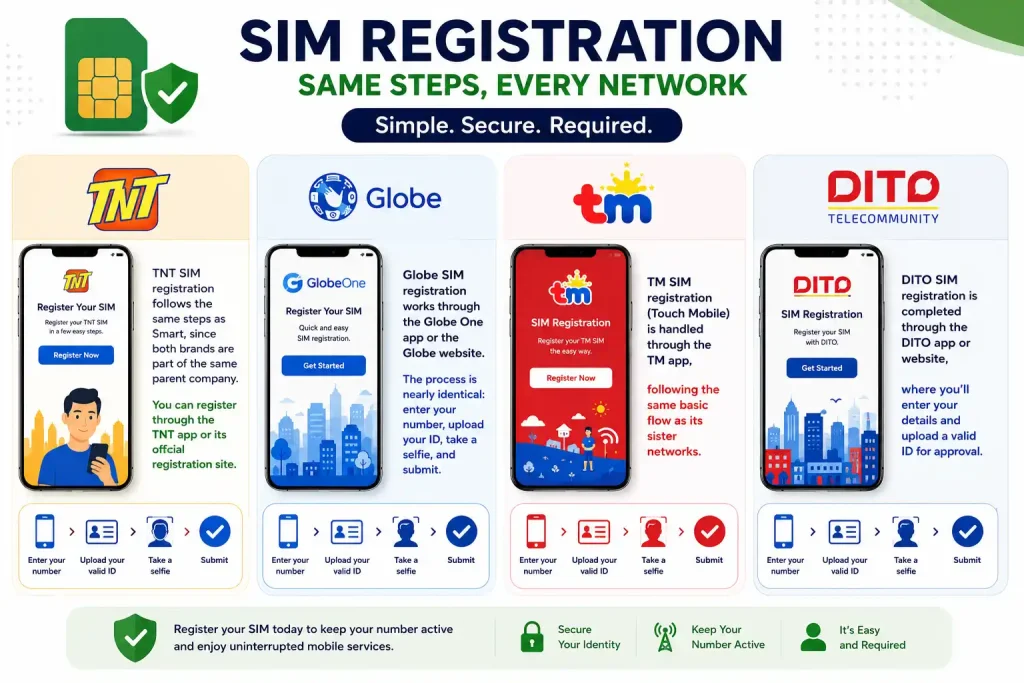
SIM Registration for Other Networks (TNT, Globe, TM, DITO)
Smart isn’t the only network with this requirement. Here’s how the process compares across TNT, Smart Globe, TM, and DITO.
TNT / Globe / TM / DITO
Register sim card tnt follows the same steps as Smart, since both brands are part of the same parent company. You can register through the Smart TNT app or its official registration site.
Globe-sim registration works through the Globe One app or the Globe Telecom website new.globe.com.ph.simreg. The process is nearly identical: enter your number, upload your ID, take a selfie, and submit.
TM sim registration (Touch Mobile) is handled through the TM smart app, following the same basic flow as its sister networks.
DITO sim registration is completed through the dito card Telecommunity app or website, where you’ll enter your details and upload a valid ID for approval.
| Network | Portal URL | App | Approval Time | Freebie |
|---|---|---|---|---|
| Smart | simreg.smart.com.ph | GigaLife | 24–72 hrs | 3GB Roaming Data |
| TNT | smart.com.ph/simreg | GigaLife | 24–72 hrs | 3GB Roaming Data |
| Globe | new.globe.com.ph/simreg | Globe One | 24–72 hrs | Varies by promo |
| TM | new.globe.com.ph/simreg | Globe One | 24–72 hrs | Varies by promo |
| DITO | dito.ph/registerDITO | DITO App | 24–72 hrs | Bonus Data (limited) |
While each brand runs its own system, the steps are almost the same everywhere: verify your number, submit your ID, take a selfie, and wait for approval.
How to Register an eSIM (Smart, Globe Sim Registration, and DITO)?
If you’re wondering how to register Globe SIM, the process for eSIM users is slightly different because there’s no physical SIM card to insert or scan. Globe eSIM users can activate and register their SIM through the GlobeOne app, where identity globe verification is completed as part of the setup.
DITO eSIM users can complete both eSIM activation and SIM registration in the DITO app, making the process quick and convenient. Regardless of your provider, you’ll need a valid government-issued ID and a selfie to finish registration.
What Happens After Registration? (Activation Timeline)
Once you submit your sim registration form, your network reviews it. Most approvals happen within 24 to 72 hours, though it can sometimes take longer during high-traffic periods. You’ll usually get a text or in-app notification once your registration is approved.
During this waiting period, your SIM should keep working normally, so there’s no need to avoid using your phone while you wait. If your review is taking longer than a few days, it’s worth checking your status directly rather than assuming something went wrong. Sometimes a review simply takes extra time because of a high number of submissions at once, especially close to a deadline.
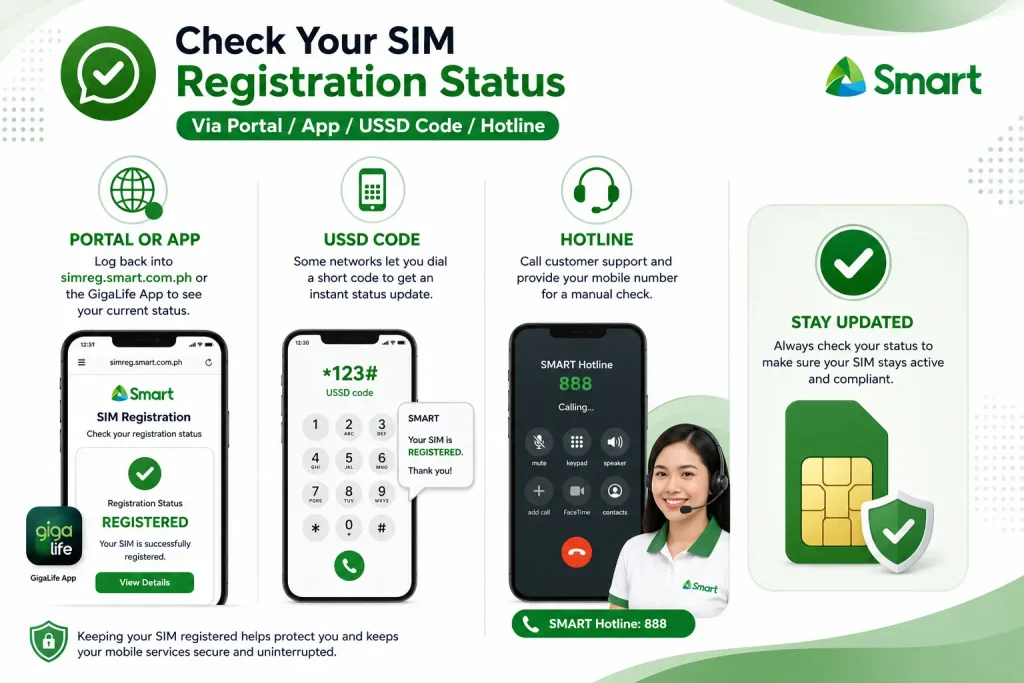
How to Check Your SIM Registration Status
Not sure if your submission went through? Here’s how to check online.
Via Portal / App / USSD Code / Hotline
- Portal or App: Log back into simreg.smart.com.ph or the GigaLife App to see your current status.
- USSD Code: Some networks let you dial a short code to get an instant status update.
- Hotline: Call customer support and provide your mobile number for a manual check.
Common Errors & How to Fix Them Easy Steps
Registration doesn’t always go smoothly. Here are the most common problems and simple fixes.
How to Reactivate a Deactivated SIM
If your SIM was deactivated because you missed the registration deadline, don’t panic. In most cases, you can still reactivate it by completing sim registration late through the app, portal, or a retail store. Once your information is verified and approved, your number should be restored, though you may need to wait a short time for service to resume fully. If reactivation doesn’t work through self-service, visiting a store in person or calling the hotline is your best next step.
Rewards & Freebies After Registration
Prepaid / Postpaid / Home WiFi Rewards
Some networks offer small rewards, such as free load, mobile data, bill discounts, or promo perks, to users who complete SIM registration early or through certain channels. These offers may be available for prepaid, postpaid, bill-paying customers, and even home WiFi accounts, although availability changes frequently.
How to Claim
Check your app’s notifications or rewards section after registration is approved. Most rewards are credited automatically, but some may require you to tap “claim” within the app.
Is Your Personal Data Safe? (Privacy Explained)
It’s normal to worry about sharing personal details online. Under the SIM Registration Act, telecom companies are required to protect your data and use it only for identity verification and legal purposes. Your information should not be shared publicly or sold to outside parties. If you ever suspect misuse of your data, you can report it to your network provider or the National Privacy Commission.
Networks are also required to store your data securely, following data privacy rules already set out under the Philippines’ existing privacy laws. This means access to your information is limited to authorized systems and personnel only. Still, it’s a good habit to only sim register through official apps and websites, and to avoid clicking links from unknown numbers claiming to help with registration, since scammers sometimes copy the look of real registration pages to steal personal information instead.
Customer Support & Helplines
If you run into any issues that self-service tools can’t solve, each network offers a customer support hotline and in-app chat support. Keep your mobile number and registration reference handy when you call, as this speeds up the process.
Video Guide: Step-by-Step Tutorial
If you’d rather watch than read, most networks publish official video walkthroughs on their YouTube channels showing the exact registration steps on screen. These can be especially helpful if you get stuck on a specific part of the form.
FAQs
Conclusion
Completing TM 5G SIM Registration Online (Official Link) 2026 is quick, free, and required by law for every mobile user in the Philippines. Whether you’re using Smart, TNT, Globe, TM, or DITO, the registration steps are simple: verify your mobile number, upload a valid government-issued ID, take a clear selfie, and submit your details. If you run into errors during the process, most issues can be resolved with a quick retry, a clearer photo, or by contacting customer support. Don’t wait until your SIM gets deactivated—complete your TM SIM registration number today and stay connected without interruption.
Disclaimer: This website is for informational purposes only. We are not affiliated with, endorsed by, or officially connected to any government agency, telecom provider, or official organization. Always verify information through the relevant official sources.